Portable IoT Data Exports: Schema, Counts and Reconciliation
A useful export lets another person reconstruct what each row means. A file that opens in a spreadsheet is not necessarily complete, correctly typed or suitable for checking a pilot. Preserve identity, units, time definitions and row-selection rules alongside the observations.
This guide designs a small portable export package for sensor records. The examples are synthetic and independent of a particular dashboard. They focus on verifying a handoff, not on choosing a commercial analytics product.
Deliver data with a compact contract
A practical package can contain an observations file, a schema description, an installation-history file where needed and a manifest describing the export. The manifest should state the selection window, filters, creation time, row count and checksums. It should also identify which schema and processing revision produced interpreted values.
| Field | Type and meaning | Validation |
|---|---|---|
| asset_id | Text; logical monitored asset | Preserve spelling and leading zeros |
| device_id | Text; physical observation source | Apply its documented canonical form |
| observation_id | Text; identity within the export contract | Check uniqueness at the intended scope |
| acquired_at / received_at | Explicit timestamps with defined boundaries | Validate representation and record unknown acquisition time |
| temperature_c | Decimal value in degrees Celsius | Parse under the stated convention; do not rescale again |
| validity | Documented categorical state | Keep invalid or unavailable distinct from a valid zero |
Do not export a rounded display label if the receiving analysis needs the underlying interpreted value. Conversely, do not suggest that extra decimal digits establish sensor accuracy. A value’s precision of representation and the measurement’s quality are separate properties.
Specify the CSV dialect instead of guessing
For this example, choose UTF-8, a comma delimiter, a header row and a documented quoting convention. RFC 4180 describes quoting fields that contain commas, line breaks or double quotes, with an embedded double quote represented by a doubled quote. This matters when an asset description contains punctuation or a note spans several lines.
A comma in a quoted field is not an additional column. Likewise, a newline inside a quoted field does not necessarily start a new record. Use a CSV parser rather than splitting each line at commas. Python’s CSV documentation recommends opening files with newline="" so the module can handle newlines correctly.
import csv

with open("observations.csv", encoding="utf-8", newline="") as handle:
    rows = list(csv.DictReader(handle))

record_count = len(rows)
asset_ids = [row["asset_id"] for row in rows]
This fragment demonstrates parsing, not complete validation. It leaves identifiers as text. The actual validator should check required columns, field types, permitted missing values and the row-identity rule. Do not let a spreadsheet’s automatic conversion turn a label such as 00017 into a different identifier.
Reconcile the rows before calculating performance
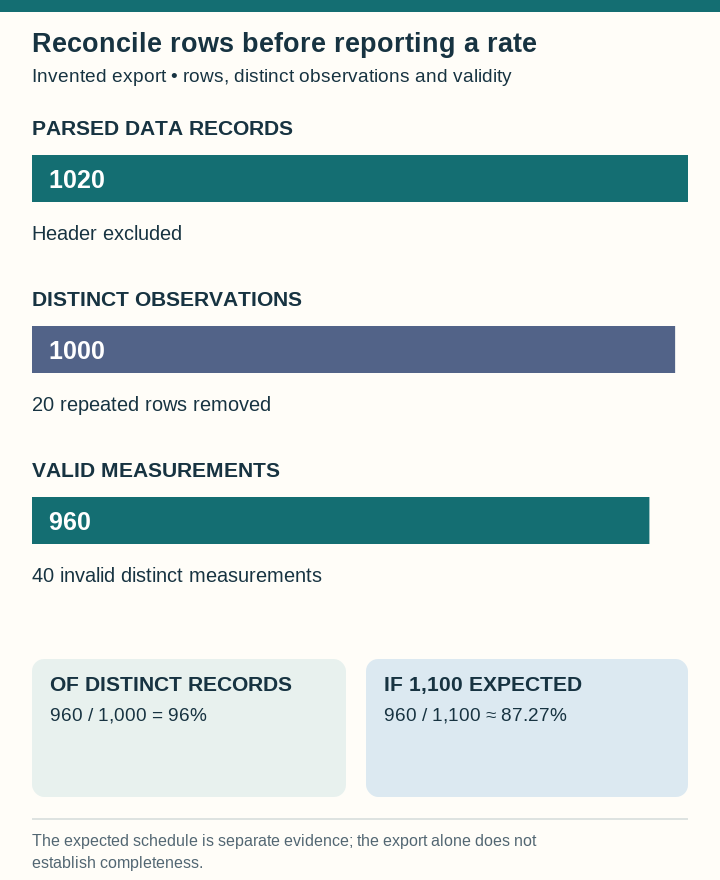
Consider a constructed export containing 1,020 parsed data records. Twenty are repeated rows under the agreed identity rule, leaving 1,000 distinct observations. Forty of those distinct observations have an invalid measurement state, leaving 960 valid measurements. These counts answer different questions and should not be collapsed into one success rate.
| Step | Count | Meaning |
|---|---|---|
| Parsed data records | 1,020 | Rows read by the CSV parser, excluding the header |
| Repeated rows identified | 20 | Additional rows under the agreed duplicate rule |
| Distinct observations | 1,000 | One canonical record for each observation identity |
| Invalid distinct measurements | 40 | Retained observations that cannot supply a valid value |
| Valid distinct measurements | 960 | 96% of distinct observations in this export |
The 96% figure does not measure completeness against a planned schedule. If 1,100 observations were expected under a separately verified schedule, the 960 valid observations would represent approximately 87.27% of that expected population. The export alone cannot establish the expected denominator.
Also check conflicting duplicates. Two rows with the same claimed observation identity but different values are not simply interchangeable copies. Preserve the conflict for investigation. The ingestion guide explains why identity and content checks need to agree across the live system and the export.
Make the time window reproducible
State which timestamp controls inclusion. “November 13 records” could mean measurements acquired that day, callbacks received that day or records processed that day. Late observations can move between those populations. Define a start-inclusive, end-exclusive interval or another explicit convention and retain it in the manifest.
For example, a UTC acquisition window beginning at midnight on November 13 and ending at midnight on November 14 includes the first boundary and excludes the second. It still needs a policy for unknown acquisition time. Do not silently replace unknown times with receipt times and then call the result an acquisition-based export.
The timestamp guide develops those distinctions. If devices were replaced during the window, include the applicable installation history so the receiving analyst can understand which physical unit produced each record.
Use checksums for the right purpose
A checksum such as SHA-256 can detect whether a delivered file differs from the bytes for which the manifest was prepared. It does not prove that the original records were true, complete or collected by an authorized device. Keep file integrity separate from evidence quality.
Calculate the checksum after finalizing the file. Changing line endings, column order or quoting changes its bytes even if a parser would produce equivalent values. The recipient should verify the received file before making a transformed working copy. If a corrected export is issued, give it a new revision and retain the reason for the correction.
- Parse: confirm the file is readable under the declared dialect.
- Validate: check columns, types, units and identity rules.
- Reconcile: explain duplicates, invalid values, exclusions and expected counts.
- Preserve: keep the original package and document transformations.
Finish by opening the package independently of the dashboard that generated it. Reconstruct a few known observations, including a zero value, an invalid record and a late arrival. That small exercise often exposes a missing unit or hidden assumption before the entire analysis depends on it.